




It's three in the morning. The customer says "the site is slow". You open the dashboard and there are forty beautiful graphs that don't answer the only question that matters: why. Half an hour later someone finds the problem in a log nobody had looked at because it had spent weeks buried under three thousand lines of noise per minute. That wasn't observability: it was decoration with Grafana.
Observability has a bad reputation among small teams: it sounds like a three-SaaS-tool stack, a four-figure bill and a dedicated engineer. Reality is kinder if you understand which problem it solves and in what order to build it. This guide is about that: what it really is, what each pillar gives you and what to set up when the whole team fits in one room.
What Observability Really Is
Forget the academic definition. In practice, observability is the ability to answer "why is this happening?" without deploying new code or guessing. It's not having data: it's being able to ask questions you hadn't anticipated when you wrote the system.
The difference from classic monitoring is subtle but decisive: monitoring checks what you already knew could fail (high CPU, full disk); observability is for what you didn't know — the new failure, the weird interaction, the "this has never happened before". If your alerts only cover the predictable, you have monitoring; observability starts where your imagination ends.
The Three Pillars Without the Dogma
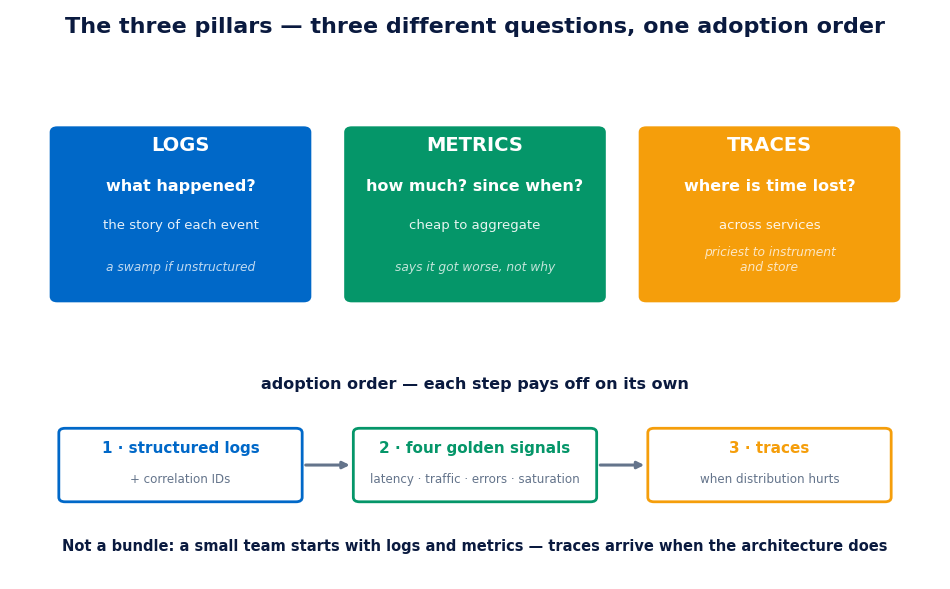
Logs, metrics and traces aren't three products to buy: they're three ways of looking at the same system, each with its own question:
- Logs: what happened? The detailed account of every event. Irreplaceable for reconstructing a sequence ("the user clicked, the request arrived, the query failed"). Their weakness: they're text, they don't aggregate, and as soon as there's volume they become a swamp unless they're structured (JSON with fields, not pretty sentences).
- Metrics: how much and since when? Numbers that aggregate cheaply: p95 latency, errors per minute, in-flight requests. The most economical way to know something is wrong and to draw trends. Their weakness: they tell you it got worse, not why.
- Traces: where is the time lost? The journey of a request across services. In a monolith they add little; as soon as a request touches three processes, they're the only way to see which piece ate the 800 ms. Their weakness: they're the most expensive pillar to instrument and to store.
The practical key: the pillars are not adopted at once. A small team starts with structured logs and a few well-chosen metrics, and adds traces when the system's distribution demands it — which is exactly when the architecture gets complicated, not before.
The Mistake of Starting with the Tools
"Prometheus or Datadog?" is the wrong question at the wrong time. Tools are chosen once you know which questions need answering. Start with your business questions:
- How do I know the customer is having a bad time before they call? (→ symptom metrics: latency, errors, saturation)
- When something fails, can I reconstruct what happened without reproducing it? (→ structured logs with correlation IDs)
- Do I know which service or which query ate the time? (→ traces, or profiling, or logs with per-phase timings)
With those answers clear, the stack choice comes down to budget and operations. And an uncomfortable truth: a simple stack the team looks at every day is worth more than a sophisticated one that someone only opens when everything is already on fire.
What to Set Up with a Small Team
The configuration that delivers 80% of the value with 20% of the effort:
- Structured, centralised logs with a correlation ID. JSON with fixed fields (level, service, request_id, user if applicable) sent to a single searchable place. The correlation ID crossing the whole request is the multiplier: it turns a thousand loose lines into a story.
- The four golden signals per service. Latency, traffic, errors and saturation. Four metrics per service, not forty. If those four are healthy, the service is healthy; if one goes sideways, you already have the "what" to chase the "why" in the logs.
- One dashboard per service, not per technology. The panel that answers "is my service okay?" at a glance. The per-database, per-queue and per-namespace panels will be looked at by whoever is debugging; the service one is looked at by everyone.
- Traces only when it hurts. Monolith or two services: logs with per-phase timings are enough. Distributed architecture with mysterious latencies: OpenTelemetry and move on. Adopting traces "just in case" means paying for the most expensive pillar without needing it — the same criterion as with Kubernetes: when you need it and when you don't.
- Short, cheap retention. You don't need year-old logs in hot storage. 7-14 days hot, the rest archived cold or simply gone. Half the observability bill is usually nostalgia.
Alerts That Mean Something
The observability graveyard is full of Slack channels with 200 alerts a day that nobody reads. The rule that prevents it is brutal and simple: every alert must demand immediate human action. If there's no action, it's not an alert: it's a metric with delusions, and it belongs on a dashboard, not in the channel.
Alert on symptoms, not causes. "CPU at 90%" wakes nobody up: high CPU is a possible cause, not a problem. "Checkout p95 exceeds 2 seconds" is, because it means customers suffering right now. Causes are investigated calmly the next morning; symptoms are what justify waking a person up. And every alert that fires and requires no action gets deleted or turned into a metric: no exceptions, or the channel dies of fatigue within a month.
The Costs Nobody Tells You About
- Cardinality. A label per user or per UUID in your metrics turns the bill into abstract art. Labels go in the logs; metrics aggregate few, low-cardinality dimensions.
- Success-path log volume. Logging every OK request at INFO level multiplies cost without adding information. Raise the default level and drop to DEBUG per service when investigating.
- The maintenance time. Every dashboard needs an owner and every alert, review. One hour a month of "observability hygiene" keeps the system from rotting; nobody budgets it and everyone pays it in incidents.
- Deployment observability. If your CI/CD pipelines don't record which version went out and when, every regression starts with twenty minutes of archaeology. A deployment marker on the metrics is the cheapest line in this whole guide.
In Short
Observability is answering "why" without deploying anything. The three pillars answer different questions — logs the what, metrics the how much, traces the where — and they're adopted in that order, not as a bundle. A small team goes very far with structured logs with a correlation ID, the four golden signals per service and alerts that only fire when they demand action. The rest gets bought when it hurts, with the bill and the questions in front of you.
If your systems fail and the investigation lasts longer than the fix, or if the monitoring bill grows faster than the service, we can review your setup and tune it to your actual team. Let's talk →
Keep reading: CI/CD for teams still deploying by hand.