




There's a scene that repeats itself in many companies: the team has a monolithic application running happily on a couple of servers, someone comes back from a conference full of enthusiasm, and six months later there's a Kubernetes cluster in production that nobody fully understands, eating 30% of the team's time to orchestrate… four containers.
Kubernetes is an extraordinary tool — in fact, it's the de facto standard for orchestrating containers at scale. The problem isn't the tool: it's adopting it before the problem it solves actually exists. This guide gives you the criteria to decide honestly: clear signals that you need it, clear signals that it's overkill, and the in-between alternatives almost nobody tells you about.
The Problem: Adopting the Solution Before the Problem
Kubernetes solves a very specific problem: orchestrating many containers, across many machines, with frequent deployments and high-availability requirements. When that's your problem, there's nothing better. When it isn't, Kubernetes doesn't just sit idle: it becomes a second product your team has to maintain, with its learning curve, its 3 a.m. incidents and its bills.
The anti-pattern has a name: resume-driven development. Choosing the technology that looks good on a CV or in a conference talk instead of the one that fits the system's real scale. And the real scale of the vast majority of products is far more modest than their infrastructure suggests.
What Kubernetes Actually Solves
Before deciding, it's worth being precise about what you buy when you adopt Kubernetes:
- Orchestration: decides which node runs each container, restarts it if it dies, moves it if the node fails.
- Automatic scaling: more replicas when load rises, fewer when it drops — driven by CPU, memory or your own metrics.
- Declarative deployments: you describe the desired state (manifests) and the system converges towards it; progressive rollouts and rollbacks included.
- Service discovery and internal networking: services find each other without hardcoded IPs.
- Self-healing: health checks that pull failing workloads out of rotation and replace them without human intervention.
If you read that list and thought "I barely need any of this", you already have half your answer.
Signals You DO Need It
Kubernetes starts paying for its costs when several of these conditions are true at once:
- A real microservices architecture. Not "we have three modules": dozens of services deployed independently, with different teams that need release autonomy.
- Very frequent deployments. Several times a day, with canary releases, feature flags and fast rollbacks as a business requirement, not a whim.
- Genuinely variable load. Predictable peaks (campaigns, month-end) or unpredictable ones that make autoscaling cheaper than over-provisioning machines.
- Strict availability requirements. SLAs of 99.9% or higher, where self-healing and multi-node (or multi-zone) distribution are a contractual need.
- A team with platform capacity. At least two or three people who can dedicate a serious share of their time to the platform — because the cluster is an internal product, not a detail.
- Multi-environment or multi-cloud as a requirement. Real portability between clouds, or between on-premise and cloud — not as a slide-deck argument.
If four or more apply, Kubernetes is probably your answer. If one or two apply, keep reading.
Signals It's Overkill (Even If It Hurts)
- A well-built monolith. A modular monolith deployed on one or two machines with solid CI is a legitimate, highly productive architecture. Putting it in Kubernetes doesn't improve it: it just makes it more expensive to operate.
- A small team with no platform profile. If nobody wants (or is able) to own the cluster, the cluster will end up owning the team.
- Weekly or monthly deploys. Progressive rollout machinery and service meshes are pure overhead if you deploy calmly on Fridays.
- Predictable, modest load. If your all-time peak fits on a medium-sized machine, you're paying autoscaling complexity for a problem you don't have.
- "To learn it". Learning Kubernetes is great — in a playground, with k3s or kind locally. Production is not the lab.
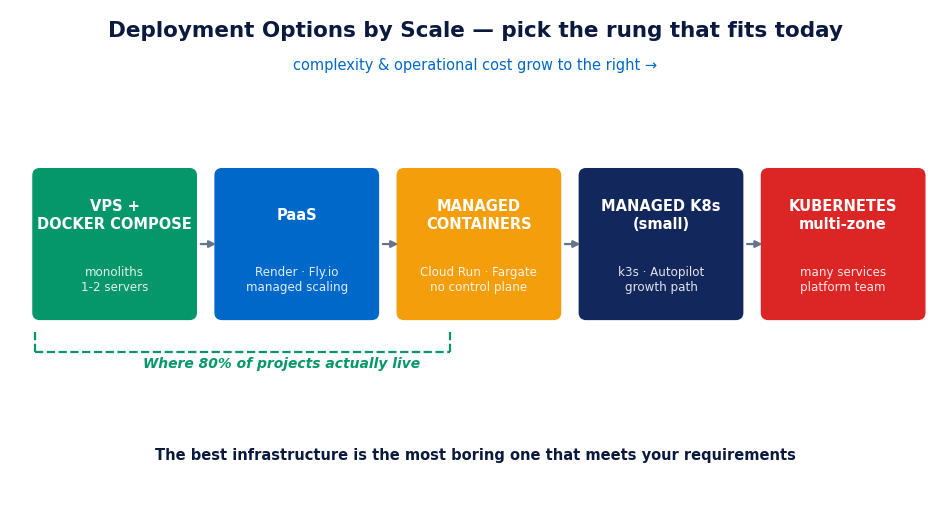
The In-Between Alternatives (Where 80% of Projects Live)
Between "a VPS with Docker Compose" and "multi-zone Kubernetes" there's a whole spectrum of serious options:
- Docker Compose on one or two servers: perfectly valid for monoliths and small architectures. With a good CI pipeline, tested backups and monitoring, it handles far more traffic than most people believe.
- PaaS (Render, Railway, Fly.io, App Engine, Azure App Service): git-push deploys, managed scaling, certificates and load balancing included. You pay more per resource, but you buy team time — usually the most expensive resource.
- Managed containers without Kubernetes (AWS ECS/Fargate, Google Cloud Run, Azure Container Apps): run containers with autoscaling and high availability without operating a control plane. For many teams, this is the sweet spot.
- Small managed Kubernetes (k3s, GKE Autopilot, EKS with minimal node groups): if you know you're growing towards microservices, starting with a lean managed Kubernetes is a reasonable bet — the cloud absorbs the most painful parts (etcd, upgrades, certificates).
The question isn't "Kubernetes yes or no?" but "which rung of this ladder fits me today, and which will fit me in two years?".
What Kubernetes Really Costs
The Kubernetes bill isn't (just) the nodes. The real cost is operational:
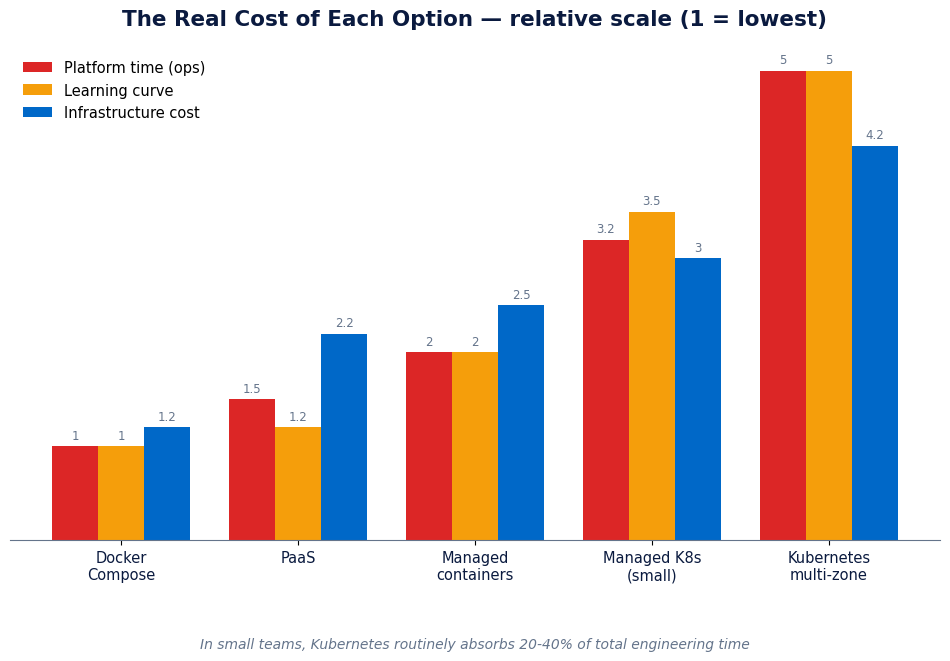
- Platform time: cluster upgrades, certificate rotation, tuning requests and limits, network incidents, storage that won't mount… In small teams we routinely measure 20% to 40% of total engineering time absorbed by the platform.
- Learning curve: pods, deployments, services, ingress, ConfigMaps, RBAC, NetworkPolicies, operators… Each concept is reasonable on its own; together they're months of training before you're productive and safe.
- Over-provisioned infrastructure: the control plane and per-node daemons consume resources before you deploy anything of yours. A small, poorly tuned cluster can cost more than the entire application it hosts — indeed it's one of the first places we look when auditing a cloud bill that's spiralling.
- Accidental complexity: debugging across layers (is it the app, the service, the ingress, DNS, a NetworkPolicy?) multiplies mean time to resolution.
None of this argues against Kubernetes when you need it: it's the price of an enormous capability. It argues against paying that price without needing the capability.
How to Decide: Three Honest Questions
- What concrete problem does it solve for me today? If the answer starts with "in the future we might…", it's a no for now. Timely migrations to Kubernetes exist and are manageable; early ones are technical debt written in YAML.
- Who will own the platform? If the answer is "we'll figure it out" or "everyone", the real answer is "nobody" — and a cluster without an owner is a ticking time bomb.
- Which simpler option did I rule out, and why? If you can't articulate why Docker Compose, a PaaS or Cloud Run don't work for you, they probably do.
Common Mistakes
- Confusing containers with Kubernetes. Docker solves packaging; Kubernetes solves orchestration at scale. You can (and often should) stop at the former.
- Building the cluster by hand "to understand it" and leaving it that way. Artisan clusters without Terraform/Ansible and no upgrade procedure become museum pieces nobody dares touch.
- Kubernetes for everything, including the database. Stateful databases are the worst thing for a small team to run on Kubernetes; a managed service (RDS, Cloud SQL) almost always wins.
- Microservices as an excuse. If your "microservices" always deploy together and share a database, you have a distributed monolith: the costs of both worlds, the benefits of neither.
- No exit plan. If you adopt Kubernetes, also define which metrics will tell you it was a mistake (platform time, cost per deploy, MTTR) so you can correct course.
In Summary
Kubernetes is the right answer to a specific problem: many services, constant deployments, demanding availability and a team with platform capacity. If that's not your problem today, the in-between alternatives — Compose, PaaS, managed containers — will give you 90% of the value for 20% of the operational cost. The best infrastructure isn't the most sophisticated: it's the most boring one that meets your requirements.
Unsure whether your deployment architecture is at the right level — too much or too little? It's one of the most common reviews in our infrastructure audits. Tell us about your case →
Keep reading: How to cut your cloud bill by 30% without touching performance.